---
summary: "Top-level overview of Clawdbot, features, and purpose"
read_when:
- Introducing Clawdbot to newcomers
---
# Clawdbot 🦞
> *"EXFOLIATE! EXFOLIATE!"* — A space lobster, probably
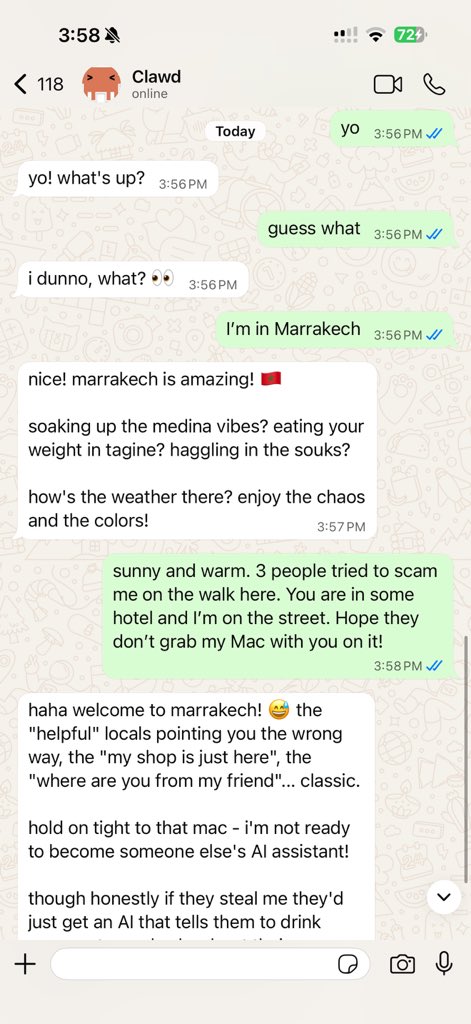
Any OS + WhatsApp/Telegram/Discord/iMessage gateway for AI agents (Pi).
Plugins add Mattermost and more.
Send a message, get an agent response — from your pocket.
GitHub ·
Releases ·
Docs ·
Clawdbot assistant setup
Clawdbot bridges WhatsApp (via WhatsApp Web / Baileys), Telegram (Bot API / grammY), Discord (Bot API / channels.discord.js), and iMessage (imsg CLI) to coding agents like [Pi](https://github.com/badlogic/pi-mono). Plugins add Mattermost (Bot API + WebSocket) and more.
Clawdbot also powers [Clawd](https://clawd.me), the space‑lobster assistant.
## Start here
- **New install from zero:** [Getting Started](/start/getting-started)
- **Guided setup (recommended):** [Wizard](/start/wizard) (`clawdbot onboard`)
- **Open the dashboard (local Gateway):** http://127.0.0.1:18789/ (or http://localhost:18789/)
If the Gateway is running on the same computer, that link opens the browser Control UI
immediately. If it fails, start the Gateway first: `clawdbot gateway`.
## Dashboard (browser Control UI)
The dashboard is the browser Control UI for chat, config, nodes, sessions, and more.
Local default: http://127.0.0.1:18789/
Remote access: [Web surfaces](/web) and [Tailscale](/gateway/tailscale)
## How it works
```
WhatsApp / Telegram / Discord / iMessage (+ plugins)
│
▼
┌───────────────────────────┐
│ Gateway │ ws://127.0.0.1:18789 (loopback-only)
│ (single source) │
│ │ http://:18793
│ │ /__clawdbot__/canvas/ (Canvas host)
└───────────┬───────────────┘
│
├─ Pi agent (RPC)
├─ CLI (clawdbot …)
├─ Chat UI (SwiftUI)
├─ macOS app (Clawdbot.app)
├─ iOS node via Gateway WS + pairing
└─ Android node via Gateway WS + pairing
```
Most operations flow through the **Gateway** (`clawdbot gateway`), a single long-running process that owns channel connections and the WebSocket control plane.
## Network model
- **One Gateway per host (recommended)**: it is the only process allowed to own the WhatsApp Web session. If you need a rescue bot or strict isolation, run multiple gateways with isolated profiles and ports; see [Multiple gateways](/gateway/multiple-gateways).
- **Loopback-first**: Gateway WS defaults to `ws://127.0.0.1:18789`.
- The wizard now generates a gateway token by default (even for loopback).
- For Tailnet access, run `clawdbot gateway --bind tailnet --token ...` (token is required for non-loopback binds).
- **Nodes**: connect to the Gateway WebSocket (LAN/tailnet/SSH as needed); legacy TCP bridge is deprecated/removed.
- **Canvas host**: HTTP file server on `canvasHost.port` (default `18793`), serving `/__clawdbot__/canvas/` for node WebViews; see [Gateway configuration](/gateway/configuration) (`canvasHost`).
- **Remote use**: SSH tunnel or tailnet/VPN; see [Remote access](/gateway/remote) and [Discovery](/gateway/discovery).
## Features (high level)
- 📱 **WhatsApp Integration** — Uses Baileys for WhatsApp Web protocol
- ✈️ **Telegram Bot** — DMs + groups via grammY
- 🎮 **Discord Bot** — DMs + guild channels via channels.discord.js
- 🧩 **Mattermost Bot (plugin)** — Bot token + WebSocket events
- 💬 **iMessage** — Local imsg CLI integration (macOS)
- 🤖 **Agent bridge** — Pi (RPC mode) with tool streaming
- ⏱️ **Streaming + chunking** — Block streaming + Telegram draft streaming details ([/concepts/streaming](/concepts/streaming))
- 🧠 **Multi-agent routing** — Route provider accounts/peers to isolated agents (workspace + per-agent sessions)
- 🔐 **Subscription auth** — Anthropic (Claude Pro/Max) + OpenAI (ChatGPT/Codex) via OAuth
- 💬 **Sessions** — Direct chats collapse into shared `main` (default); groups are isolated
- 👥 **Group Chat Support** — Mention-based by default; owner can toggle `/activation always|mention`
- 📎 **Media Support** — Send and receive images, audio, documents
- 🎤 **Voice notes** — Optional transcription hook
- 🖥️ **WebChat + macOS app** — Local UI + menu bar companion for ops and voice wake
- 📱 **iOS node** — Pairs as a node and exposes a Canvas surface
- 📱 **Android node** — Pairs as a node and exposes Canvas + Chat + Camera
Note: legacy Claude/Codex/Gemini/Opencode paths have been removed; Pi is the only coding-agent path.
## Quick start
Runtime requirement: **Node ≥ 22**.
```bash
# Recommended: global install (npm/pnpm)
npm install -g clawdbot@latest
# or: pnpm add -g clawdbot@latest
# Onboard + install the service (launchd/systemd user service)
clawdbot onboard --install-daemon
# Pair WhatsApp Web (shows QR)
clawdbot channels login
# Gateway runs via the service after onboarding; manual run is still possible:
clawdbot gateway --port 18789
```
Switching between npm and git installs later is easy: install the other flavor and run `clawdbot doctor` to update the gateway service entrypoint.
From source (development):
```bash
git clone https://github.com/clawdbot/clawdbot.git
cd clawdbot
pnpm install
pnpm ui:build # auto-installs UI deps on first run
pnpm build
clawdbot onboard --install-daemon
```
If you don’t have a global install yet, run the onboarding step via `pnpm clawdbot ...` from the repo.
Multi-instance quickstart (optional):
```bash
CLAWDBOT_CONFIG_PATH=~/.clawdbot/a.json \
CLAWDBOT_STATE_DIR=~/.clawdbot-a \
clawdbot gateway --port 19001
```
Send a test message (requires a running Gateway):
```bash
clawdbot message send --target +15555550123 --message "Hello from Clawdbot"
```
## Configuration (optional)
Config lives at `~/.clawdbot/clawdbot.json`.
- If you **do nothing**, Clawdbot uses the bundled Pi binary in RPC mode with per-sender sessions.
- If you want to lock it down, start with `channels.whatsapp.allowFrom` and (for groups) mention rules.
Example:
```json5
{
channels: {
whatsapp: {
allowFrom: ["+15555550123"],
groups: { "*": { requireMention: true } }
}
},
messages: { groupChat: { mentionPatterns: ["@clawd"] } }
}
```
## Docs
- Start here:
- [Docs hubs (all pages linked)](/start/hubs)
- [Help](/help) ← *common fixes + troubleshooting*
- [Configuration](/gateway/configuration)
- [Configuration examples](/gateway/configuration-examples)
- [Slash commands](/tools/slash-commands)
- [Multi-agent routing](/concepts/multi-agent)
- [Updating / rollback](/install/updating)
- [Pairing (DM + nodes)](/start/pairing)
- [Nix mode](/install/nix)
- [Clawdbot assistant setup (Clawd)](/start/clawd)
- [Skills](/tools/skills)
- [Skills config](/tools/skills-config)
- [Workspace templates](/reference/templates/AGENTS)
- [RPC adapters](/reference/rpc)
- [Gateway runbook](/gateway)
- [Nodes (iOS/Android)](/nodes)
- [Web surfaces (Control UI)](/web)
- [Discovery + transports](/gateway/discovery)
- [Remote access](/gateway/remote)
- Providers and UX:
- [WebChat](/web/webchat)
- [Control UI (browser)](/web/control-ui)
- [Telegram](/channels/telegram)
- [Discord](/channels/discord)
- [Mattermost (plugin)](/channels/mattermost)
- [iMessage](/channels/imessage)
- [Groups](/concepts/groups)
- [WhatsApp group messages](/concepts/group-messages)
- [Media: images](/nodes/images)
- [Media: audio](/nodes/audio)
- Companion apps:
- [macOS app](/platforms/macos)
- [iOS app](/platforms/ios)
- [Android app](/platforms/android)
- [Windows (WSL2)](/platforms/windows)
- [Linux app](/platforms/linux)
- Ops and safety:
- [Sessions](/concepts/session)
- [Cron jobs](/automation/cron-jobs)
- [Webhooks](/automation/webhook)
- [Gmail hooks (Pub/Sub)](/automation/gmail-pubsub)
- [Security](/gateway/security)
- [Troubleshooting](/gateway/troubleshooting)
## The name
**Clawdbot = CLAW + TARDIS** — because every space lobster needs a time-and-space machine.
---
*"We're all just playing with our own prompts."* — an AI, probably high on tokens
## Credits
- **Peter Steinberger** ([@steipete](https://twitter.com/steipete)) — Creator, lobster whisperer
- **Mario Zechner** ([@badlogicc](https://twitter.com/badlogicgames)) — Pi creator, security pen-tester
- **Clawd** — The space lobster who demanded a better name
## Core Contributors
- **Maxim Vovshin** (@Hyaxia, 36747317+Hyaxia@users.noreply.github.com) — Blogwatcher skill
- **Nacho Iacovino** (@nachoiacovino, nacho.iacovino@gmail.com) — Location parsing (Telegram + WhatsApp)
## License
MIT — Free as a lobster in the ocean 🦞
---
*"We're all just playing with our own prompts."* — An AI, probably high on tokens